🚀 junegunn/fzf - Release Notes
0.61.0 (2025-03-30)
- Added `--ghost=TEXT` to display a ghost text when the input is empty
  ```sh
  # Display "Type to search" when the input is empty
  fzf --ghost "Type to search"
  ```
- Added `change-ghost` and `transform-ghost` actions for dynamically changing the ghost text
- Added `change-pointer` and `transform-pointer` actions for dynamically changing the pointer sign
- Added `r` flag for placeholder expression (raw mode) for unquoted output
- Bug fixes and improvements
0.60.3 (2025-03-03)
- Bug fixes and improvements
    - [fish] Enable multiple history commands insertion (#4280) (@bitraid)
    - [walker] Append '/' to directory entries on MSYS2 (#4281)
    - Trim trailing whitespaces after processing ANSI sequences (#4282)
    - Remove temp files before `become` when using `--tmux` option (#4283)
    - Fix condition for using item numlines cache (#4285) (@alex-huff)
    - Make `--accept-nth` compatible with `--select-1` (#4287)
    - Increase the query length limit from 300 to 1000 (#4292)
    - [windows] Prevent fzf from consuming user input while paused (#4260)
0.60.2 (2025-02-23)
- Template for `--with-nth` and `--accept-nth` now supports `{n}` which evaluates to the zero-based ordinal index of the item
- Fixed a regression that caused the last field in the "nth" expression to be trimmed when a regular expression delimiter is used
    - Thanks to @phanen for the fix
- Fixed 'jump' action when the pointer is an empty string
0.60.1 (2025-02-20)
- Bug fixes and minor improvements
    - Built-in walker now prints directory entries with a trailing slash
    - Fixed a bug causing unexpected behavior with [fzf-tab](https://github.com/Aloxaf/fzf-tab). Please upgrade if you use it.
- Thanks to @alexeisersun, @bitraid, @Lompik, and @fsc0 for the contributions
0.60.0 (2025-02-12)
_Release highlights: https://junegunn.github.io/fzf/releases/0.60.0/_

- Added `--accept-nth` for choosing output fields
  ```sh
  ps -ef | fzf --multi --header-lines 1 | awk '{print $2}'
  # Becomes
  ps -ef | fzf --multi --header-lines 1 --accept-nth 2

  git branch | fzf | cut -c3-
  # Can be rewritten as
  git branch | fzf --accept-nth -1
  ```
- `--accept-nth` and `--with-nth` now support a template that includes multiple field index expressions in curly braces
  ```sh
  echo foo,bar,baz | fzf --delimiter , --accept-nth '{1}, {3}, {2}'
    # foo, baz, bar

  echo foo,bar,baz | fzf --delimiter , --with-nth '{1},{3},{2},{1..2}'
    # foo,baz,bar,foo,bar
  ```
- Added `exclude` and `exclude-multi` actions for dynamically excluding items
  ```sh
  seq 100 | fzf --bind 'ctrl-x:exclude'

  # 'exclude-multi' will exclude the selected items or the current item
  seq 100 | fzf --multi --bind 'ctrl-x:exclude-multi'
  ```
- Preview window now prints wrap indicator when wrapping is enabled
  ```sh
  seq 100 | xargs | fzf --wrap --preview 'echo {}' --preview-window wrap
  ```
- Bug fixes and improvements
0.59.0 (2025-02-02)
_Release highlights: https://junegunn.github.io/fzf/releases/0.59.0/_

- Prioritizing file name matches (#4192)
    - Added a new tiebreak option `pathname` for prioritizing file name matches
    - `--scheme=path` now sets `--tiebreak=pathname,length`
    - fzf will automatically choose `path` scheme
        * when the input is a TTY device, where fzf would start its built-in walker or run `$FZF_DEFAULT_COMMAND` which is usually a command for listing files,
        * but not when `reload` or `transform` action is bound to `start` event, because in that case, fzf can't be sure of the input type.
- Added `--header-lines-border` to display header from `--header-lines` with a separate border
  ```sh
  # Use --header-lines-border to separate two headers
  ps -ef | fzf --style full --layout reverse --header-lines 1 \
               --bind 'ctrl-r:reload(ps -ef)' --header 'Press CTRL-R to reload' \
               --header-lines-border bottom --no-list-border
  ```
- `click-header` event now sets `$FZF_CLICK_HEADER_WORD` and `$FZF_CLICK_HEADER_NTH`. You can use them to implement a clickable header for changing the search scope using the new `transform-nth` action.
  ```sh
  # Click on the header line to limit search scope
  ps -ef | fzf --style full --layout reverse --header-lines 1 \
               --header-lines-border bottom --no-list-border \
               --color fg:dim,nth:regular \
               --bind 'click-header:transform-nth(
                         echo $FZF_CLICK_HEADER_NTH
                       )+transform-prompt(
                         echo "$FZF_CLICK_HEADER_WORD> "
                       )'
  ```
    - `$FZF_KEY` was updated to expose the type of the click. e.g. `click`, `ctrl-click`, etc. You can use it to implement a more sophisticated behavior.
    - `kill` completion for bash and zsh were updated to use this feature
- Added `--no-input` option to completely disable and hide the input section
  ```sh
  # Click header to trigger search
  fzf --header '[src] [test]' --no-input --layout reverse \
      --header-border bottom --input-border \
      --bind 'click-header:transform-search:echo ${FZF_CLICK_HEADER_WORD:1:-1}'

  # Vim-like mode switch
  fzf --layout reverse-list --no-input \
      --bind 'j:down,k:up,/:show-input+unbind(j,k,/)' \
      --bind 'enter,esc,ctrl-c:transform:
        if [[ $FZF_INPUT_STATE = enabled ]]; then
          echo "rebind(j,k,/)+hide-input"
        elif [[ $FZF_KEY = enter ]]; then
          echo accept
        else
          echo abort
        fi
      '
  ```
    - You can later show the input section using `show-input` or `toggle-input` action, and hide it again using `hide-input`, or `toggle-input`.
- Extended `{q}` placeholder to support ranges. e.g. `{q:1}`, `{q:2..}`, etc.
- Added `search(...)` and `transform-search(...)` action to trigger an fzf search with an arbitrary query string. This can be used to extend the search syntax of fzf. In the following example, fzf will use the first word of the query to trigger ripgrep search, and use the rest of the query to perform fzf search within the result.
  ```sh
  export TEMP=$(mktemp -u)
  trap 'rm -f "$TEMP"' EXIT

  TRANSFORMER='
    rg_pat={q:1}      # The first word is passed to ripgrep
    fzf_pat={q:2..}   # The rest are passed to fzf

    if ! [[ -r "$TEMP" ]] || [[ $rg_pat != $(cat "$TEMP") ]]; then
      echo "$rg_pat" > "$TEMP"
      printf "reload:sleep 0.1; rg --column --line-number --no-heading --color=always --smart-case %q || true" "$rg_pat"
    fi
    echo "+search:$fzf_pat"
  '
  fzf --ansi --disabled \
    --with-shell 'bash -c' \
    --bind "start,change:transform:$TRANSFORMER"
  ```
- You can now bind actions to multiple keys and events at once by writing a comma-separated list of keys and events before the colon
  ```sh
  # Load 'ps -ef' output on start and reload it on CTRL-R
  fzf --bind 'start,ctrl-r:reload:ps -ef'
  ```
- `--min-height` option now takes a number followed by `+`, which tells fzf to show at least that many items in the list section. The default value is now changed to `10+`.
  ```sh
  # You will only see the input section which takes 3 lines
  fzf --style=full --height 1% --min-height 3

  # You will see 3 items in the list section
  fzf --style full --height 1% --min-height 3+
  ```
    - Shell integration scripts were updated to use `--min-height 20+` by default
- `--header-lines` will be displayed at the top in `reverse-list` layout
- Added `bell` action to ring the terminal bell
  ```sh
  # Press CTRL-Y to copy the current line to the clipboard and ring the bell
  fzf --bind 'ctrl-y:execute-silent(echo -n {} | pbcopy)+bell'
  ```
- Added `toggle-bind` action
- Bug fixes and improvements
- Fixed fish script to support fish 3.1.2 or later (@bitraid)
0.58.0 (2025-01-19)
_Release highlights: https://junegunn.github.io/fzf/releases/0.58.0/_
This version introduces three new border types, `--list-border`, `--input-border`, and `--header-border`, offering much greater flexibility for customizing the user interface.
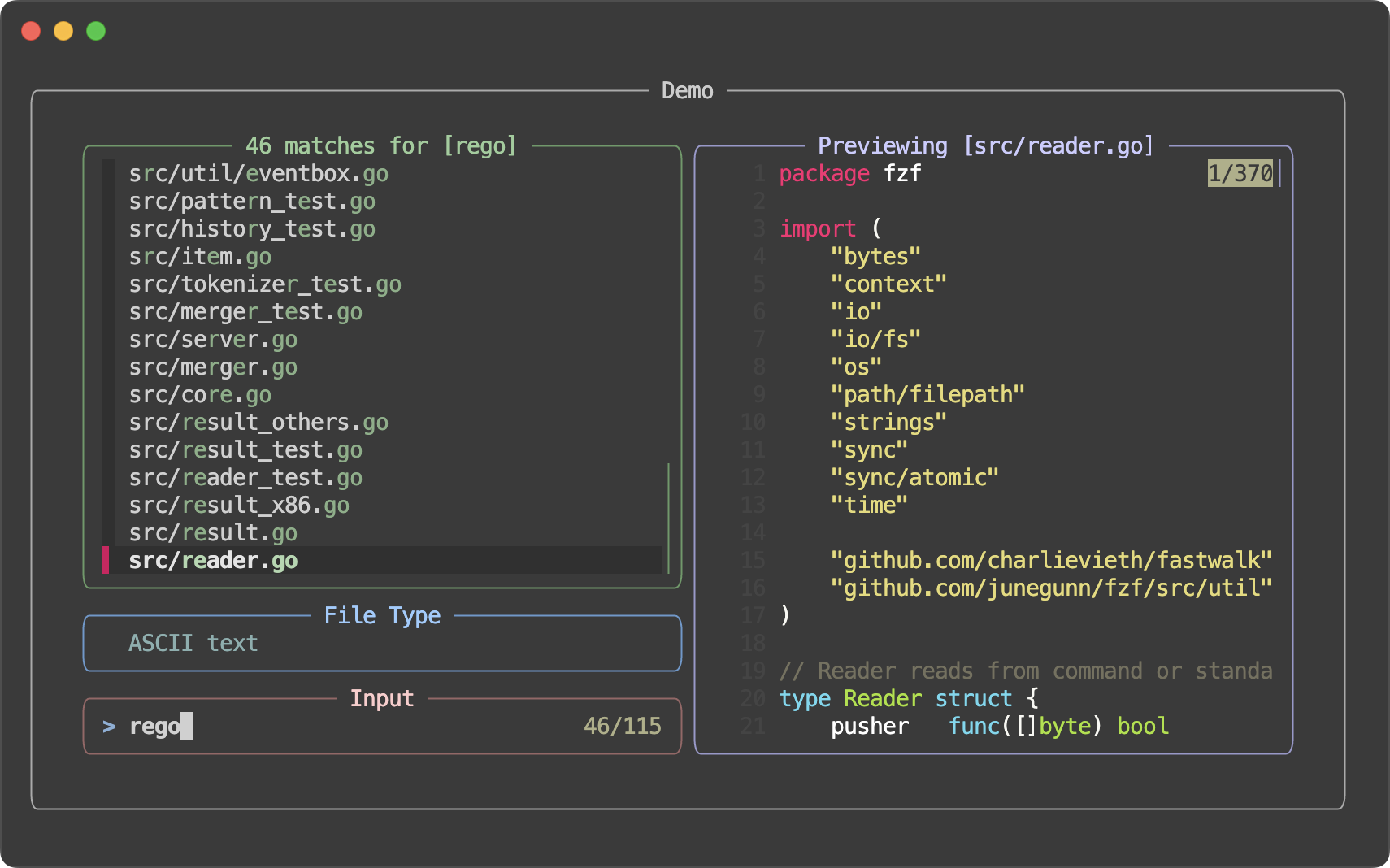 Also, fzf now offers "style presets" for quick customization, which can be activated using the `--style` option.
| Preset | Screenshot |
| :--- | :--- |
| `default` |
Also, fzf now offers "style presets" for quick customization, which can be activated using the `--style` option.
| Preset | Screenshot |
| :--- | :--- |
| `default` | 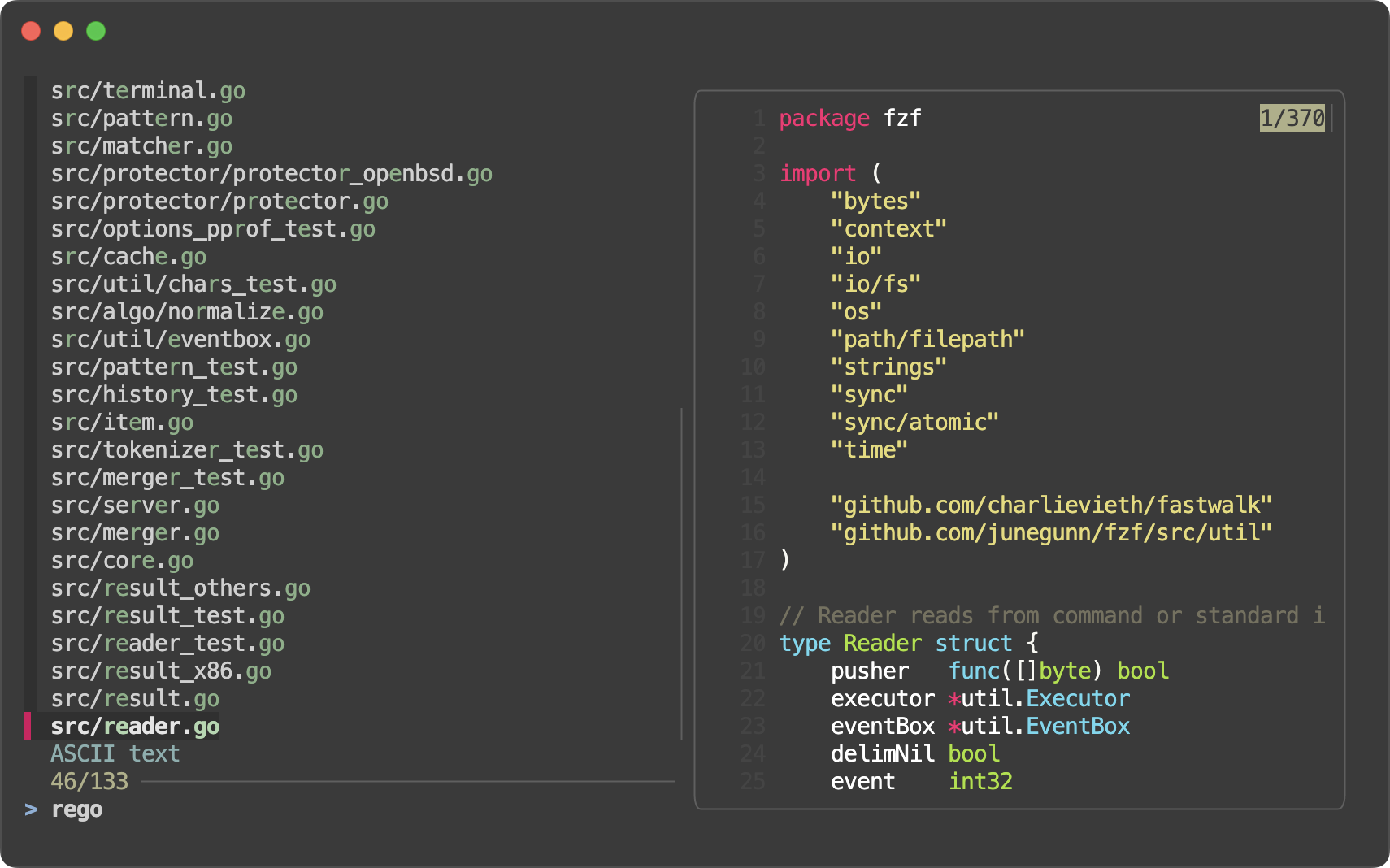 |
| `full` |
|
| `full` | 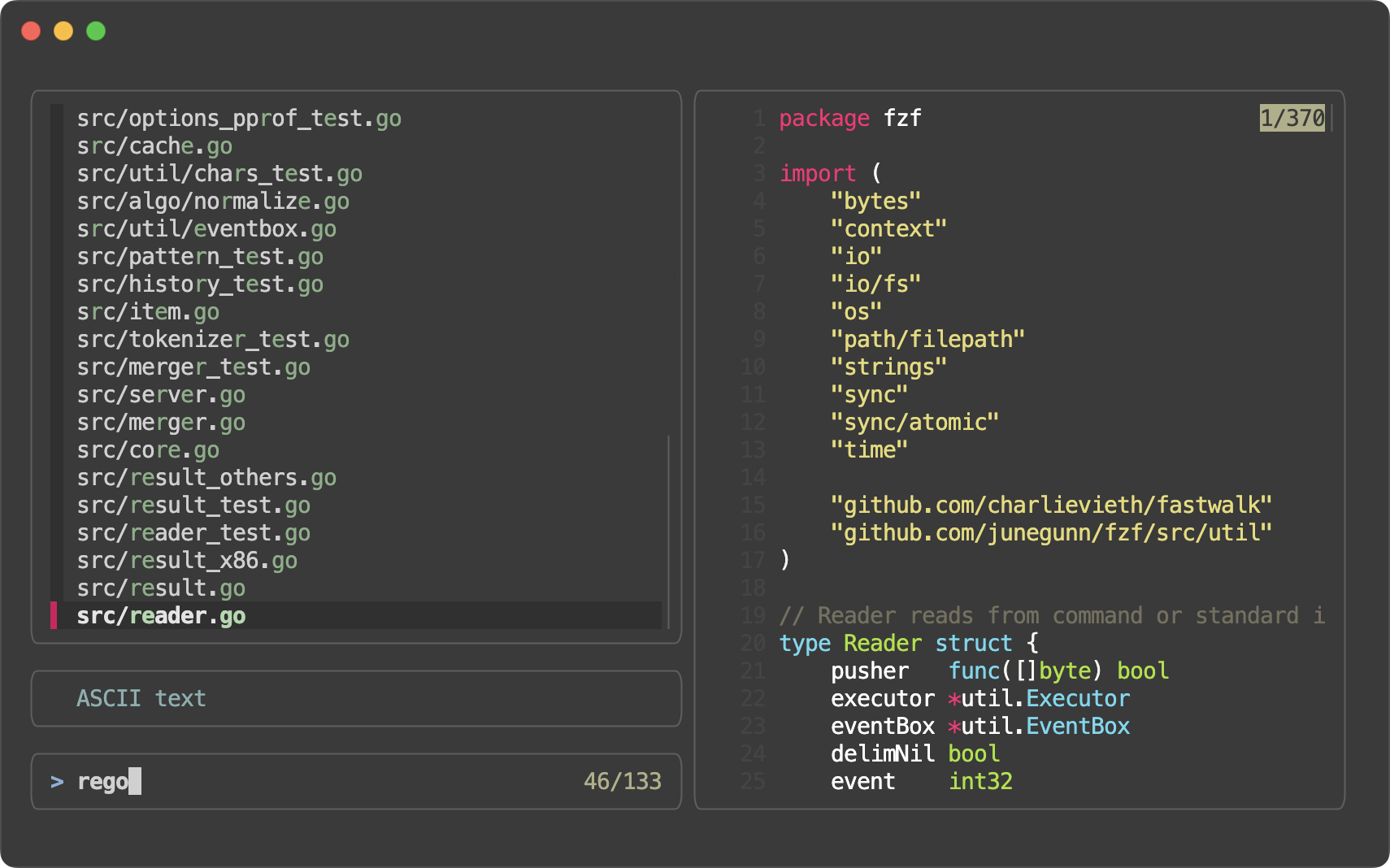 |
| `minimal` |
|
| `minimal` | 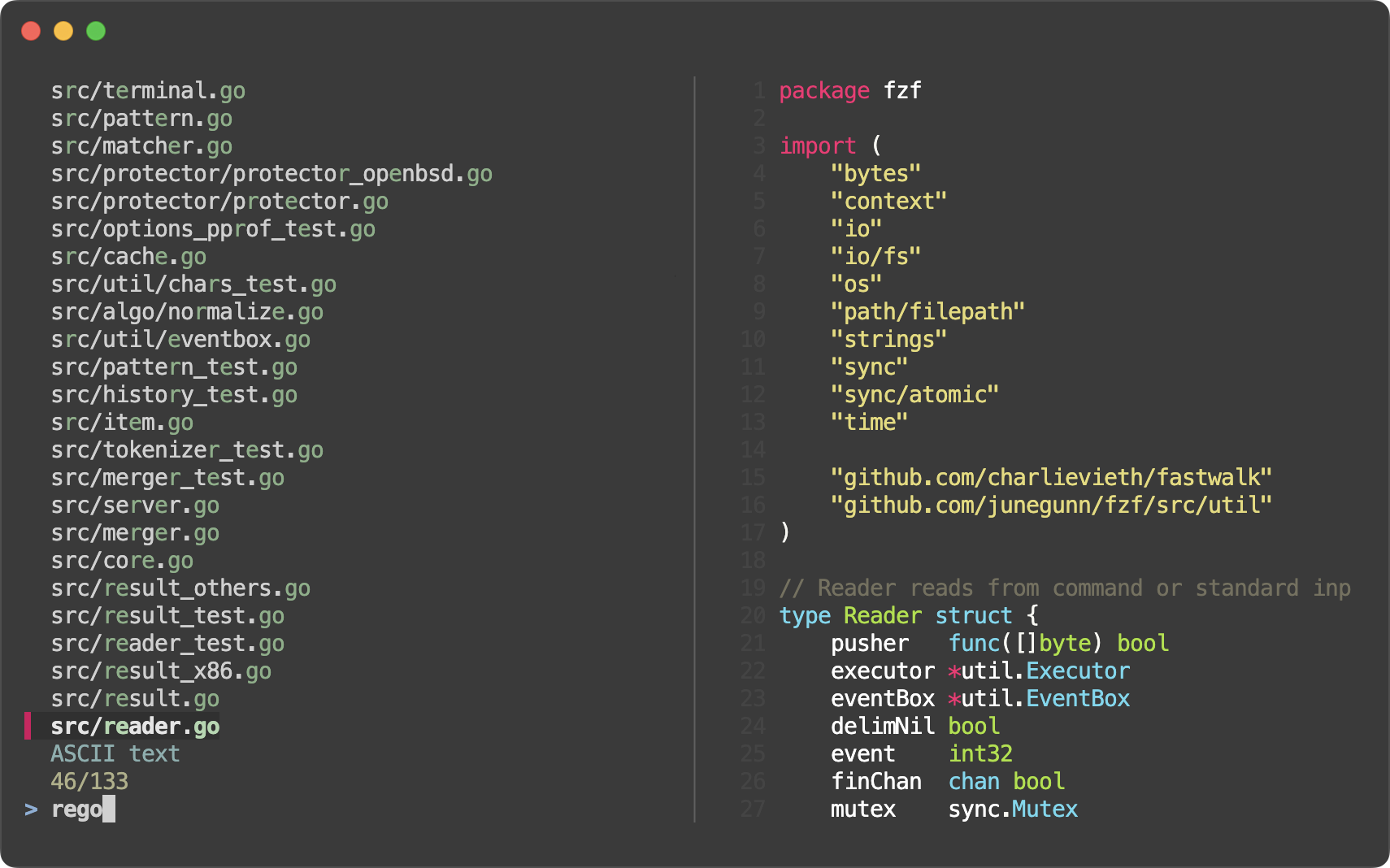 |
- Style presets (#4160)
- `--style=full[:BORDER_STYLE]`
- `--style=default`
- `--style=minimal`
- Border and label for the list section (#4148)
- Options
- `--list-border[=STYLE]`
- `--list-label=LABEL`
- `--list-label-pos=COL[:bottom]`
- Colors
- `list-fg`
- `list-bg`
- `list-border`
- `list-label`
- Actions
- `change-list-label`
- `transform-list-label`
- Border and label for the input section (prompt line and info line) (#4154)
- Options
- `--input-border[=STYLE]`
- `--input-label=LABEL`
- `--input-label-pos=COL[:bottom]`
- Colors
- `input-fg` (`query`)
- `input-bg`
- `input-border`
- `input-label`
- Actions
- `change-input-label`
- `transform-input-label`
- Border and label for the header section (#4159)
- Options
- `--header-border[=STYLE]`
- `--header-label=LABEL`
- `--header-label-pos=COL[:bottom]`
- Colors
- `header-fg` (`header`)
- `header-bg`
- `header-border`
- `header-label`
- Actions
- `change-header-label`
- `transform-header-label`
- Added `--preview-border[=STYLE]` as short for `--preview-window=border[-STYLE]`
- Added new preview border style `line` which draws a single separator line between the preview window and the rest of the interface
- fzf will now render a dashed line (`┈┈`) in each `--gap` for better visual separation.
```sh
# All bash/zsh functions, highlighted
declare -f |
perl -0 -pe 's/^}\n/}\0/gm' |
bat --plain --language bash --color always |
fzf --read0 --ansi --layout reverse --multi --highlight-line --gap
```

- You can customize the line using `--gap-line[=STR]`.
- You can specify `border-native` to `--tmux` so that native tmux border is used instead of `--border`. This can be useful if you start a different program from inside the popup.
```sh
fzf --tmux border-native --bind 'enter:execute:less {}'
```
- Added `toggle-multi-line` action
- Added `toggle-hscroll` action
- Added `change-nth` action for dynamically changing the value of the `--nth` option
```sh
# Start with --nth 1, then 2, then 3, then back to the default, 1
echo 'foo foobar foobarbaz' | fzf --bind 'space:change-nth(2|3|)' --nth 1 -q foo
```
- `--nth` parts of each line can now be rendered in a different text style
```sh
# nth in a different style
ls -al | fzf --nth -1 --color nth:italic
ls -al | fzf --nth -1 --color nth:reverse
ls -al | fzf --nth -1 --color nth:reverse:bold
# Dim the other parts
ls -al | fzf --nth -1 --color nth:regular,fg:dim
# With 'change-nth'. The current nth option is exported as $FZF_NTH.
ps -ef | fzf --reverse --header-lines 1 --header-border bottom --input-border \
--color nth:regular,fg:dim \
--bind 'ctrl-n:change-nth(8..|1|2|3|4|5|6|7|)' \
--bind 'result:transform-prompt:echo "${FZF_NTH}> "'
```

- A single-character delimiter is now treated as a plain string delimiter rather than a regular expression delimiter, even if it's a regular expression meta-character.
- This means you can just write `--delimiter '|'` instead of escaping it as `--delimiter '\|'`
- Bug fixes
- Bug fixes and improvements in fish scripts (thanks to @bitraid)
|
- Style presets (#4160)
- `--style=full[:BORDER_STYLE]`
- `--style=default`
- `--style=minimal`
- Border and label for the list section (#4148)
- Options
- `--list-border[=STYLE]`
- `--list-label=LABEL`
- `--list-label-pos=COL[:bottom]`
- Colors
- `list-fg`
- `list-bg`
- `list-border`
- `list-label`
- Actions
- `change-list-label`
- `transform-list-label`
- Border and label for the input section (prompt line and info line) (#4154)
- Options
- `--input-border[=STYLE]`
- `--input-label=LABEL`
- `--input-label-pos=COL[:bottom]`
- Colors
- `input-fg` (`query`)
- `input-bg`
- `input-border`
- `input-label`
- Actions
- `change-input-label`
- `transform-input-label`
- Border and label for the header section (#4159)
- Options
- `--header-border[=STYLE]`
- `--header-label=LABEL`
- `--header-label-pos=COL[:bottom]`
- Colors
- `header-fg` (`header`)
- `header-bg`
- `header-border`
- `header-label`
- Actions
- `change-header-label`
- `transform-header-label`
- Added `--preview-border[=STYLE]` as short for `--preview-window=border[-STYLE]`
- Added new preview border style `line` which draws a single separator line between the preview window and the rest of the interface
- fzf will now render a dashed line (`┈┈`) in each `--gap` for better visual separation.
```sh
# All bash/zsh functions, highlighted
declare -f |
perl -0 -pe 's/^}\n/}\0/gm' |
bat --plain --language bash --color always |
fzf --read0 --ansi --layout reverse --multi --highlight-line --gap
```

- You can customize the line using `--gap-line[=STR]`.
- You can specify `border-native` to `--tmux` so that native tmux border is used instead of `--border`. This can be useful if you start a different program from inside the popup.
```sh
fzf --tmux border-native --bind 'enter:execute:less {}'
```
- Added `toggle-multi-line` action
- Added `toggle-hscroll` action
- Added `change-nth` action for dynamically changing the value of the `--nth` option
```sh
# Start with --nth 1, then 2, then 3, then back to the default, 1
echo 'foo foobar foobarbaz' | fzf --bind 'space:change-nth(2|3|)' --nth 1 -q foo
```
- `--nth` parts of each line can now be rendered in a different text style
```sh
# nth in a different style
ls -al | fzf --nth -1 --color nth:italic
ls -al | fzf --nth -1 --color nth:reverse
ls -al | fzf --nth -1 --color nth:reverse:bold
# Dim the other parts
ls -al | fzf --nth -1 --color nth:regular,fg:dim
# With 'change-nth'. The current nth option is exported as $FZF_NTH.
ps -ef | fzf --reverse --header-lines 1 --header-border bottom --input-border \
--color nth:regular,fg:dim \
--bind 'ctrl-n:change-nth(8..|1|2|3|4|5|6|7|)' \
--bind 'result:transform-prompt:echo "${FZF_NTH}> "'
```

- A single-character delimiter is now treated as a plain string delimiter rather than a regular expression delimiter, even if it's a regular expression meta-character.
- This means you can just write `--delimiter '|'` instead of escaping it as `--delimiter '\|'`
- Bug fixes
- Bug fixes and improvements in fish scripts (thanks to @bitraid)
0.57.0 (2024-12-15)
- You can now resize the preview window by dragging the border
- Built-in walker improvements
    - `--walker-root` can take multiple directory arguments. e.g. `--walker-root include src lib`
    - `--walker-skip` can handle multi-component patterns. e.g. `--walker-skip target/build`
- Removed long processing delay when displaying images in the preview window
- `FZF_PREVIEW_*` environment variables are exported to all child processes (#4098)
- Bug fixes in fish scripts
0.56.3 (2024-11-15)
- Bug fixes in zsh scripts
    - fix(zsh): handle backtick trigger edge case (#4090)
    - revert(zsh): remove 'fc -RI' call in the history widget (#4093)
    - Thanks to @LangLangBart for the contributions
0.56.2 (2024-11-11)
- Bug fixes
    - Fixed abnormal scrolling behavior when `--wrap` is set (#4083)
    - [zsh] Fixed warning message when `ksh_arrays` is set (#4084)
0.56.1 (2024-11-10)
- Bug fixes and improvements
    - Fixed a race condition which would cause fzf to present stale results after `reload` (#4070)
    - `page-up` and `page-down` actions now work correctly with multi-line items (#4069)
    - `{n}` is allowed in `SCROLL` expression in `--preview-window` (#4079)
    - [zsh] Fixed regression in history loading with shared option (#4071)
    - [zsh] Better command extraction in zsh completion (#4082)
- Thanks to @LangLangBart, @jaydee-coder, @alex-huff, and @vejkse for the contributions
0.56.0 (2024-10-27)
- Added `--gap[=N]` option to display empty lines between items.
- This can be useful to visually separate adjacent multi-line items.
```sh
# All bash functions, highlighted
declare -f | perl -0777 -pe 's/^}\n/}\0/gm' |
bat --plain --language bash --color always |
fzf --read0 --ansi --reverse --multi --highlight-line --gap
```
 - Or just to make the list easier to read. For single-line items, you probably want to set `--color gutter:-1` as well to hide the gutter.
```sh
fzf --info inline-right --gap --color gutter:-1
```
- Or just to make the list easier to read. For single-line items, you probably want to set `--color gutter:-1` as well to hide the gutter.
```sh
fzf --info inline-right --gap --color gutter:-1
```
 - Added `noinfo` option to `--preview-window` to hide the scroll indicator in the preview window
- Bug fixes
- Thanks to @LangLangBart, @akinomyoga, and @charlievieth for fixing the bugs
- Added `noinfo` option to `--preview-window` to hide the scroll indicator in the preview window
- Bug fixes
- Thanks to @LangLangBart, @akinomyoga, and @charlievieth for fixing the bugs
0.55.0 (2024-08-29)
_Release highlights: https://junegunn.github.io/fzf/releases/0.55.0/_

- Added `exact-boundary-match` type to the search syntax. When a search term is single-quoted, fzf will search for the exact occurrences of the string with both ends at word boundaries.
  ```sh
  fzf --query "'here'" << EOF
  come here
  not there
  EOF
  ```
- [bash] Fuzzy path completion is enabled for all commands
    - 1. If the default completion is not already set
    - 2. And if the current bash supports `complete -D` option
    - However, fuzzy completion for some commands can be "dynamically" disabled by the dynamic completion loader
    - See the comment in `__fzf_default_completion` function for more information
- Comments are now allowed in `$FZF_DEFAULT_OPTS` and `$FZF_DEFAULT_OPTS_FILE`
  ```sh
  export FZF_DEFAULT_OPTS='
    # Layout options
    --layout=reverse
    --info=inline-right   # Show info on the right side of the prompt line
    # ...
  '
  ```
- Hyperlinks (OSC 8) are now supported in the preview window and in the main window
  ```sh
  printf '<< \e]8;;http://github.com/junegunn/fzf\e\\Link to \e[32mfz\e[0mf\e]8;;\e\\ >>' | fzf --ansi

  fzf --preview "printf '<< \e]8;;http://github.com/junegunn/fzf\e\\Link to \e[32mfz\e[0mf\e]8;;\e\\ >>'"
  ```
- The default `--ellipsis` is now `··` instead of `..`.
- [vim] A spec can have `exit` callback that is called with the exit status of fzf
    - This can be used to clean up temporary resources or restore the original state when fzf is closed without a selection
- Fixed `--tmux bottom` when the status line is not at the bottom
- Fixed extra scroll offset in multi-line mode (`--read0` or `--wrap`)
- Added fallback `ps` command for `kill` completion on Cygwin
0.54.3 (2024-07-31)
- Fixed incompatibility of adaptive height specification and 'start:reload'
  ```sh
  # A regression in 0.54.0 would cause this to fail
  fzf --height '~100%' --bind 'start:reload:seq 10'
  ```
- Environment variables are now available to `$FZF_DEFAULT_COMMAND`
  ```sh
  FZF_DEFAULT_COMMAND='echo $FZF_QUERY' fzf --query foo
  ```
0.54.2 (2024-07-26)
- Fixed incorrect syntax highlighting of truncated multi-line entries
- Updated GoReleaser to 2.1.0 to simplify notarization of macOS binaries
    - macOS archives will be in `tar.gz` format instead of `zip` format since we no longer notarize the zip files but binaries
- (Windows) Reverted a mintty fix in 0.54.0
    - As a result, mouse may not work on mintty in fullscreen mode. However, fzf will correctly read non-ASCII input in fullscreen mode (`--no-height`).
    - fzf unfortunately cannot read non-ASCII input when not in fullscreen mode on Windows. So if you need to input non-ASCII characters, add `--no-height` to your `$FZF_DEFAULT_OPTS`.
    - Any help in fixing this issue will be appreciated (#3799, #3847).
0.54.1 (2024-07-19)
- Updated [fastwalk](https://github.com/charlievieth/fastwalk) dependency for built-in directory walker
    - [fastwalk: add optional sorting and improve documentation](https://github.com/charlievieth/fastwalk/pull/27)
    - [fastwalk: only check if MSYSTEM is set during MSYS/MSYS2](https://github.com/charlievieth/fastwalk/pull/28)
    - Thanks to @charlievieth
- Reverted ALT-C binding of fish to use `cd` instead of `builtin cd`
    - `builtin cd` was introduced to work around a bug of `cd` coming from `zoxide init --cmd cd fish` where it cannot handle `--` argument.
    - However, the default `cd` of fish is actually a wrapper function for supporting `cd -`, so we want to use it instead.
    - See [#3928](https://github.com/junegunn/fzf/pull/3928) for more information and consider helping zoxide fix the bug.
0.54.0 (2024-07-08)
_Release highlights: https://junegunn.github.io/fzf/releases/0.54.0/_

- Implemented line wrap of long items
    - `--wrap` option enables line wrap
    - `--wrap-sign` customizes the sign for wrapped lines (default: `↳ `)
    - `toggle-wrap` action toggles line wrap
      ```sh
      history | fzf --tac --wrap --bind 'ctrl-/:toggle-wrap' --wrap-sign $'\t↳ '
      ```
    - fzf by default binds `CTRL-/` and `ALT-/` to `toggle-wrap`
- Updated shell integration scripts to leverage line wrap
    - CTRL-R binding includes `--wrap-sign $'\t↳ '` to indent wrapped lines
    - `kill **` completion uses `--wrap` to show the whole line by default instead of showing it in the preview window
- Added `--info-command` option for customizing the info line
  ```sh
  # Prepend the current cursor position in yellow
  fzf --info-command='echo -e "\x1b[33;1m$FZF_POS\x1b[m/$FZF_INFO 💛"'
  ```
    - `$FZF_INFO` is set to the original info text
    - ANSI color codes are supported
- Pointer and marker signs can be set to empty strings
  ```sh
  # Minimal style
  fzf --pointer '' --marker '' --prompt '' --info hidden
  ```
- Better cache management and improved rendering for `--tail`
- Improved `--sync` behavior
    - When `--sync` is provided, fzf will not render the interface until the initial filtering and the associated actions (bound to any of `start`, `load`, `result`, or `focus`) are complete.
      ```sh
      # fzf will not render intermediate states
      (sleep 1; seq 1000000; sleep 1) |
        fzf --sync --query 5 --listen --bind start:up,load:up,result:up,focus:change-header:Ready
      ```
- GET endpoint is now available from `execute` and `transform` actions (it used to timeout due to lock conflict)
  ```sh
  fzf --listen --sync --bind 'focus:transform-header:curl -s localhost:$FZF_PORT?limit=0 | jq .'
  ```
- Added `offset-middle` action to place the current item is in the middle of the screen
- fzf will not start the initial reader when `reload` or `reload-sync` is bound to `start` event. `fzf < /dev/null` or `: | fzf` are no longer required and extraneous `load` event will not fire due to the empty list.
  ```sh
  # Now this will work as expected. Previously, this would print an invalid header line.
  # `fzf < /dev/null` or `: | fzf` would fix the problem, but then an extraneous
  # `load` event would fire and the header would be prematurely updated.
  fzf --header 'Loading ...' --header-lines 1 \
      --bind 'start:reload:sleep 1; ps -ef' \
      --bind 'load:change-header:Loaded!'
  ```
- Fixed mouse support on Windows
- Fixed crash when using `--tiebreak=end` with very long items
- zsh 5.0 compatibility (thanks to @LangLangBart)
- Fixed `--walker-skip` to also skip symlinks to directories
- Fixed `result` event not fired when input stream is not complete
- Built-in reader of the Windows binary will print forward slashes on MSYS and WSL (thanks to @charlievieth)
- New tags will have `v` prefix so that they are available on https://proxy.golang.org/
0.53.0 (2024-06-06)
Release highlights: https://junegunn.github.io/fzf/releases/0.53.0/

---

- Multi-line display
    - See [Processing multi-line items](https://junegunn.github.io/fzf/tips/processing-multi-line-items/)
    - fzf can now display multi-line items
      ```sh
      # All bash functions, highlighted
      declare -f | perl -0777 -pe 's/^}\n/}\0/gm' |
        bat --plain --language bash --color always |
        fzf --read0 --ansi --reverse --multi --highlight-line

      # Ripgrep multi-line output
      rg --pretty bash | perl -0777 -pe 's/\n\n/\n\0/gm' |
        fzf --read0 --ansi --multi --highlight-line --reverse --tmux 70%
      ```
        - To disable multi-line display, use `--no-multi-line`
    - CTRL-R bindings of bash, zsh, and fish have been updated to leverage multi-line display
    - The default `--pointer` and `--marker` have been changed from `>` to Unicode bar characters as they look better with multi-line items
    - Added `--marker-multi-line` to customize the select marker for multi-line entries with the default set to `╻┃╹`
      ```
      ╻First line
      ┃...
      ╹Last line
      ```
- Native tmux integration
    - Added `--tmux` option to replace fzf-tmux script and simplify distribution
      ```sh
      # --tmux [center|top|bottom|left|right][,SIZE[%]][,SIZE[%]]
      # Center, 100% width and 70% height
      fzf --tmux 100%,70% --border horizontal --padding 1,2

      # Left, 30% width
      fzf --tmux left,30%

      # Bottom, 50% height
      fzf --tmux bottom,50%
      ```
        - To keep the implementation simple, it only uses popups. You need tmux 3.3 or later.
    - To use `--tmux` in Vim plugin:
      ```vim
      let g:fzf_layout = { 'tmux': '100%,70%' }
      ```
- Added support for endless input streams
    - See [Browsing log stream with fzf](https://junegunn.github.io/fzf/tips/browsing-log-streams/)
    - Added `--tail=NUM` option to limit the number of items to keep in memory. This is useful when you want to browse an endless stream of data (e.g. log stream) with fzf while limiting memory usage.
      ```sh
      # Interactive filtering of a log stream
      tail -f *.log | fzf --tail 100000 --tac --no-sort --exact
      ```
- Better Windows Support
    - fzf now works on Git bash (mintty) out of the box via winpty integration
    - Many fixes and improvements for Windows
- man page is now embedded in the binary; `fzf --man` to see it
- Changed the default `--scroll-off` to 3, as we think it's a better default
- Process started by `execute` action now directly writes to and reads from `/dev/tty`. Manual `/dev/tty` redirection for interactive programs is no longer required.
  ```sh
  # Vim will work fine without /dev/tty redirection
  ls | fzf --bind 'space:execute:vim {}' > selected
  ```
- Added `print(...)` action to queue an arbitrary string to be printed on exit. This was mainly added to work around the limitation of `--expect` where it's not compatible with `--bind` on the same key and it would ignore other actions bound to it.
  ```sh
  # This doesn't work as expected because --expect is not compatible with --bind
  fzf --multi --expect ctrl-y --bind 'ctrl-y:select-all'

  # This is something you can do instead
  fzf --multi --bind 'enter:print()+accept,ctrl-y:select-all+print(ctrl-y)+accept'
  ```
    - We also considered making them compatible, but realized that some users may have been relying on the current behavior.
- [`NO_COLOR`](https://no-color.org/) environment variable is now respected. If the variable is set, fzf defaults to `--no-color` unless otherwise specified.
0.52.1 (2024-05-13)
- Fixed a critical bug in the Windows version
    - Windows users are strongly encouraged to upgrade to this version
0.52.0 (2024-05-07)
- Added `--highlight-line` to highlight the whole current line (à la `set cursorline` of Vim)
- Added color names for selected lines: `selected-fg`, `selected-bg`, and `selected-hl`
```sh
fzf --border --multi --info inline-right --layout reverse --marker ▏ --pointer ▌ --prompt '▌ ' \
--highlight-line --color gutter:-1,selected-bg:238,selected-fg:146,current-fg:189
```
 - Added `click-header` event that is triggered when the header section is clicked. When the event is triggered, `$FZF_CLICK_HEADER_COLUMN` and `$FZF_CLICK_HEADER_LINE` are set.
```sh
fd --type f |
fzf --header $'[Files] [Directories]' --header-first \
--bind 'click-header:transform:
(( FZF_CLICK_HEADER_COLUMN <= 7 )) && echo "reload(fd --type f)"
(( FZF_CLICK_HEADER_COLUMN >= 9 )) && echo "reload(fd --type d)"
'
```
- Added `$FZF_COMPLETION_{DIR,PATH}_OPTS` for separately customizing the behavior of directory and path completion
```sh
# Set --walker options without 'follow' not to follow symbolic links
FZF_COMPLETION_PATH_OPTS="--walker=file,dir,hidden"
FZF_COMPLETION_DIR_OPTS="--walker=dir,hidden"
```
- Fixed Windows argument escaping
- Bug fixes and improvements
- The code was heavily refactored to allow using fzf as a library in Go programs. The API is still experimental and subject to change.
- https://gist.github.com/junegunn/193990b65be48a38aac6ac49d5669170
- Added `click-header` event that is triggered when the header section is clicked. When the event is triggered, `$FZF_CLICK_HEADER_COLUMN` and `$FZF_CLICK_HEADER_LINE` are set.
```sh
fd --type f |
fzf --header $'[Files] [Directories]' --header-first \
--bind 'click-header:transform:
(( FZF_CLICK_HEADER_COLUMN <= 7 )) && echo "reload(fd --type f)"
(( FZF_CLICK_HEADER_COLUMN >= 9 )) && echo "reload(fd --type d)"
'
```
- Added `$FZF_COMPLETION_{DIR,PATH}_OPTS` for separately customizing the behavior of directory and path completion
```sh
# Set --walker options without 'follow' not to follow symbolic links
FZF_COMPLETION_PATH_OPTS="--walker=file,dir,hidden"
FZF_COMPLETION_DIR_OPTS="--walker=dir,hidden"
```
- Fixed Windows argument escaping
- Bug fixes and improvements
- The code was heavily refactored to allow using fzf as a library in Go programs. The API is still experimental and subject to change.
- https://gist.github.com/junegunn/193990b65be48a38aac6ac49d5669170
0.51.0 (2024-05-01)
- Added a new environment variable `$FZF_POS` exported to the child processes. It's the vertical position of the cursor in the list starting from 1.
  ```sh
  # Toggle selection to the top or to the bottom
  seq 30 | fzf --multi --bind 'load:pos(10)' \
    --bind 'shift-up:transform:for _ in $(seq $FZF_POS $FZF_MATCH_COUNT); do echo -n +toggle+up; done' \
    --bind 'shift-down:transform:for _ in $(seq 1 $FZF_POS); do echo -n +toggle+down; done'
  ```
- Added `--with-shell` option to start child processes with a custom shell command and flags
  ```sh
  gem list | fzf --with-shell 'ruby -e' \
    --preview 'pp Gem::Specification.find_by_name({1})' \
    --bind 'ctrl-o:execute-silent:
        spec = Gem::Specification.find_by_name({1})
        [spec.homepage, *spec.metadata.filter { _1.end_with?("uri") }.values].uniq.each do
          system "open", _1
        end
    '
  ```
- Added `change-multi` action for dynamically changing `--multi` option
    - `change-multi` - enable multi-select mode with no limit
    - `change-multi(NUM)` - enable multi-select mode with a limit
    - `change-multi(0)` - disable multi-select mode
- Windows improvements
    - `become` action is now supported on Windows
        - Unlike in *nix, this does not use `execve(2)`. Instead it spawns a new process and waits for it to finish, so the exact behavior may differ.
    - Fixed argument escaping for Windows cmd.exe. No redundant escaping of backslashes.
- Bug fixes and improvements
0.50.0 (2024-04-14)
- Search performance optimization. You can observe 50%+ improvement in some scenarios.
  ```
  $ rg --line-number --no-heading --smart-case . > $DATA

  $ wc < $DATA
   5520118 26862362 897487793

  $ hyperfine -w 1 -L bin fzf-0.49.0,fzf-7ce6452,fzf-a5447b8,fzf '{bin} --filter "///" < $DATA | head -30'
  Summary
    fzf --filter "///" < $DATA | head -30 ran
      1.16 ± 0.03 times faster than fzf-a5447b8 --filter "///" < $DATA | head -30
      1.23 ± 0.03 times faster than fzf-7ce6452 --filter "///" < $DATA | head -30
      1.52 ± 0.03 times faster than fzf-0.49.0 --filter "///" < $DATA | head -30
  ```
- Added `jump` and `jump-cancel` events that are triggered when leaving `jump` mode
  ```sh
  # Default behavior
  fzf --bind space:jump

  # Same as jump-accept action
  fzf --bind space:jump,jump:accept

  # Accept on jump, abort on cancel
  fzf --bind space:jump,jump:accept,jump-cancel:abort

  # Change header on jump-cancel
  fzf --bind 'space:change-header(Type jump label)+jump,jump-cancel:change-header:Jump cancelled'
  ```
- Added a new environment variable `$FZF_KEY` exported to the child processes. It's the name of the last key pressed.
  ```sh
  fzf --bind 'space:jump,jump:accept,jump-cancel:transform:[[ $FZF_KEY =~ ctrl-c ]] && echo abort'
  ```
- fzf can be built with profiling options. See [BUILD.md](BUILD.md) for more information.
- Bug fixes
0.49.0 (2024-04-04)
- Ingestion performance improved by around 40% (more or less depending on options)
```
$ time wc data
5513620 37997130 547840920 data
real 0m0.822s
user 0m0.764s
sys 0m0.052s
$ hyperfine -L bin fzf-0.48.1,fzf '{bin} --sync --bind load:accept < data'
Benchmark 1: fzf-0.48.1 --sync --bind load:accept < data
Time (mean ± σ): 440.3 ms ± 4.9 ms [User: 501.8 ms, System: 117.0 ms]
Range (min … max): 432.8 ms … 446.1 ms 10 runs
Benchmark 2: fzf --sync --bind load:accept < data
Time (mean ± σ): 303.3 ms ± 4.5 ms [User: 320.1 ms, System: 108.6 ms]
Range (min … max): 296.6 ms … 311.4 ms 10 runs
Summary
fzf --sync --bind load:accept < data ran
1.45 ± 0.03 times faster than fzf-0.48.1 --sync --bind load:accept < data
```
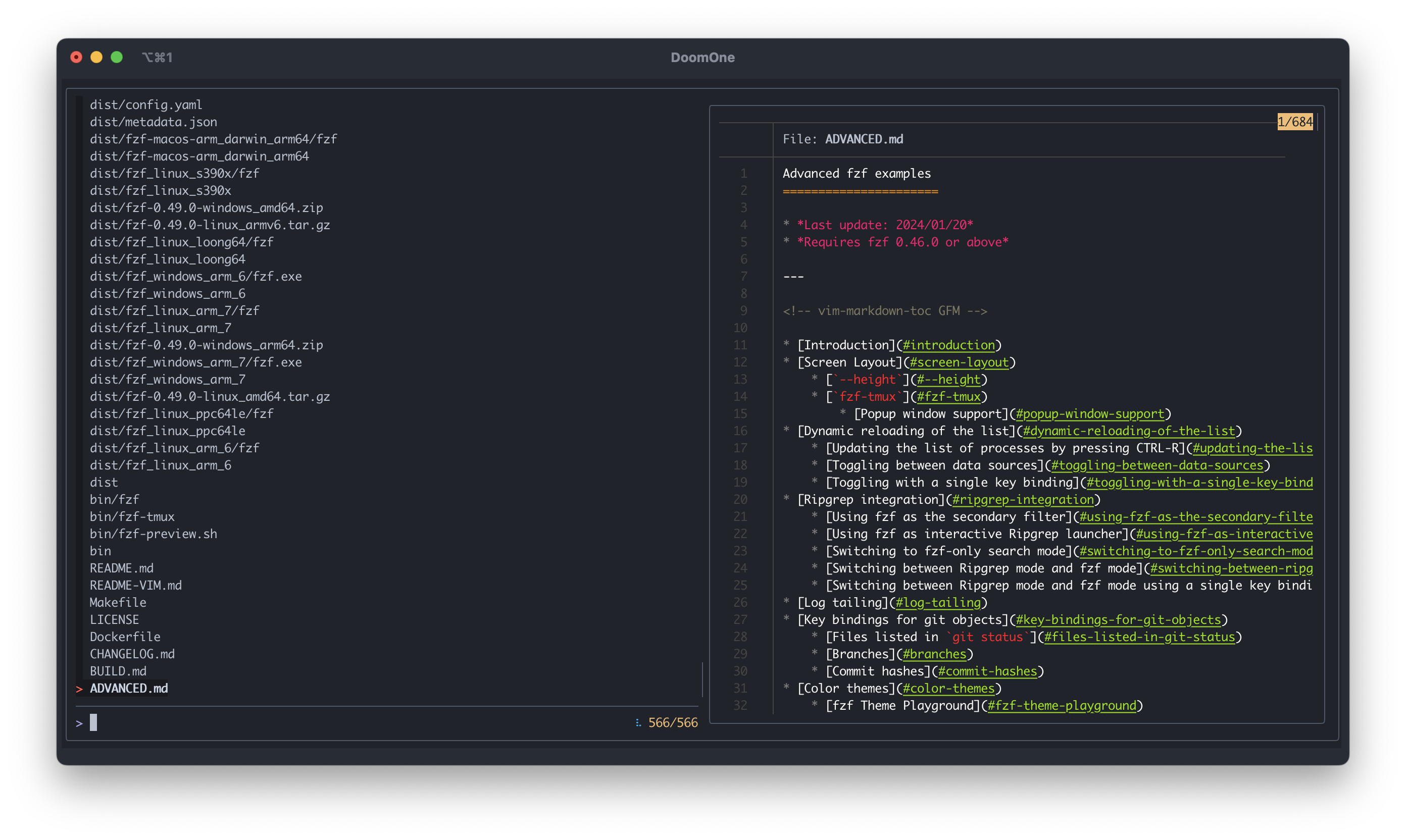
- `--info=hidden` and `--info=inline-right` will no longer hide the horizontal separator by default. This gives you more flexibility in customizing the layout.
```sh
fzf --border --info=inline-right
fzf --border --info=inline-right --separator ═
fzf --border --info=inline-right --no-separator
fzf --border --info=hidden
fzf --border --info=hidden --separator ━
fzf --border --info=hidden --no-separator
```
 - Added two environment variables exported to the child processes
- `FZF_PREVIEW_LABEL`
- `FZF_BORDER_LABEL`
```sh
# Use the current value of $FZF_PREVIEW_LABEL to determine which actions to perform
git ls-files |
fzf --header 'Press CTRL-P to change preview mode' \
--bind='ctrl-p:transform:[[ $FZF_PREVIEW_LABEL =~ cat ]] \
&& echo "change-preview(git log --color=always \{})+change-preview-label([[ log ]])" \
|| echo "change-preview(bat --color=always \{})+change-preview-label([[ cat ]])"'
```
- Renamed `track` action to `track-current` to highlight the difference between the global tracking state set by `--track` and a one-off tracking action
- `track` is still available as an alias
- Added `untrack-current` and `toggle-track-current` actions
- `*-current` actions are no-op when the global tracking state is set
- Bug fixes and minor improvements
- Added two environment variables exported to the child processes
- `FZF_PREVIEW_LABEL`
- `FZF_BORDER_LABEL`
```sh
# Use the current value of $FZF_PREVIEW_LABEL to determine which actions to perform
git ls-files |
fzf --header 'Press CTRL-P to change preview mode' \
--bind='ctrl-p:transform:[[ $FZF_PREVIEW_LABEL =~ cat ]] \
&& echo "change-preview(git log --color=always \{})+change-preview-label([[ log ]])" \
|| echo "change-preview(bat --color=always \{})+change-preview-label([[ cat ]])"'
```
- Renamed `track` action to `track-current` to highlight the difference between the global tracking state set by `--track` and a one-off tracking action
- `track` is still available as an alias
- Added `untrack-current` and `toggle-track-current` actions
- `*-current` actions are no-op when the global tracking state is set
- Bug fixes and minor improvements
0.48.1 (2024-03-17)
- CTRL-T and ALT-C bindings can be disabled by setting `FZF_CTRL_T_COMMAND` and `FZF_ALT_C_COMMAND` to empty strings respectively when sourcing the script
    ```sh
    # bash
    FZF_CTRL_T_COMMAND= FZF_ALT_C_COMMAND= eval "$(fzf --bash)"

    # zsh
    FZF_CTRL_T_COMMAND= FZF_ALT_C_COMMAND= eval "$(fzf --zsh)"

    # fish
    fzf --fish | FZF_CTRL_T_COMMAND= FZF_ALT_C_COMMAND= source
    ```
    - Setting the variables after sourcing the script will have no effect
- Bug fixes
0.48.0 (2024-03-13)
- Shell integration scripts are now embedded in the fzf binary. This simplifies the distribution, and the users are less likely to have problems caused by using incompatible scripts and binaries.
    - bash
      ```sh
      # Set up fzf key bindings and fuzzy completion
      eval "$(fzf --bash)"
      ```
    - zsh
      ```sh
      # Set up fzf key bindings and fuzzy completion
      eval "$(fzf --zsh)"
      ```
    - fish
      ```fish
      # Set up fzf key bindings
      fzf --fish | source
      ```
- Added options for customizing the behavior of the built-in walker
    | Option               | Description                                       | Default              |
    | ---                  | ---                                               | ---                  |
    | `--walker=OPTS`      | Walker options (`[file][,dir][,follow][,hidden]`) | `file,follow,hidden` |
    | `--walker-root=DIR`  | Root directory from which to start walker         | `.`                  |
    | `--walker-skip=DIRS` | Comma-separated list of directory names to skip   | `.git,node_modules`  |
    - Examples
        ```sh
        # Built-in walker is only used by standalone fzf when $FZF_DEFAULT_COMMAND is not set
        unset FZF_DEFAULT_COMMAND

        fzf # default: --walker=file,follow,hidden --walker-root=. --walker-skip=.git,node_modules
        fzf --walker=file,dir,hidden,follow --walker-skip=.git,node_modules,target

        # Walker options in $FZF_DEFAULT_OPTS
        export FZF_DEFAULT_OPTS="--walker=file,dir,hidden,follow --walker-skip=.git,node_modules,target"
        fzf

        # Reading from STDIN; --walker is ignored
        seq 100 | fzf --walker=dir

        # Reading from $FZF_DEFAULT_COMMAND; --walker is ignored
        export FZF_DEFAULT_COMMAND='seq 100'
        fzf --walker=dir
        ```
- Shell integration scripts have been updated to use the built-in walker with these new options and they are now much faster out of the box.
0.47.0 (2024-03-10)
- Replaced ["the default find command"][find] with a built-in directory walker to simplify the code and to achieve better performance and consistent behavior across platforms. This doesn't affect you if you have `$FZF_DEFAULT_COMMAND` set.
    - Breaking changes:
        - Unlike [the previous "find" command][find], the new traversal code will list hidden files, but hidden directories will still be ignored
        - No filtering of `devtmpfs` or `proc` types
        - Traversal is parallelized, so the order of the entries will be different each time
    - You may wonder why fzf implements directory walker anyway when it's a filter program following the Unix philosophy. But fzf has had [the walker code for years][walker] to tackle the performance problem on Windows. And I decided to use the same approach on different platforms as well for the benefits listed above.
    - Built-in walker is using the excellent [charlievieth/fastwalk][fastwalk] library, which easily outperforms its competitors and supports safely following symlinks.
- Added `$FZF_DEFAULT_OPTS_FILE` to allow managing default options in a file
    - See [#3618](https://github.com/junegunn/fzf/pull/3618)
    - Option precedence from lower to higher
        1. Options read from `$FZF_DEFAULT_OPTS_FILE`
        1. Options from `$FZF_DEFAULT_OPTS`
        1. Options from command-line arguments
- Bug fixes and improvements

[find]: https://github.com/junegunn/fzf/blob/0.46.1/src/constants.go#L60-L64
[walker]: https://github.com/junegunn/fzf/pull/1847
[fastwalk]: https://github.com/charlievieth/fastwalk
0.46.1 (2024-02-01)
- Bug fixes and improvements
- Fixed Windows binaries
- Downgraded Go version to 1.20 to support older versions of Windows
    - https://tip.golang.org/doc/go1.21#windows
- Updated [rivo/uniseg](https://github.com/rivo/uniseg) dependency to v0.4.6
0.46.0 (2024-01-23)
- Added two new events
    - `result` - triggered when the filtering for the current query is complete and the result list is ready
    - `resize` - triggered when the terminal size is changed
- fzf now exports the following environment variables to the child processes
  | Variable           | Description                                                 |
  | ---                | ---                                                         |
  | `FZF_LINES`        | Number of lines fzf takes up excluding padding and margin   |
  | `FZF_COLUMNS`      | Number of columns fzf takes up excluding padding and margin |
  | `FZF_TOTAL_COUNT`  | Total number of items                                       |
  | `FZF_MATCH_COUNT`  | Number of matched items                                     |
  | `FZF_SELECT_COUNT` | Number of selected items                                    |
  | `FZF_QUERY`        | Current query string                                        |
  | `FZF_PROMPT`       | Prompt string                                               |
  | `FZF_ACTION`       | The name of the last action performed                       |
  - This allows you to write sophisticated transformations like so
    ```sh
    # Script to dynamically resize the preview window
    transformer='
      # 1 line for info, another for prompt, and 2 more lines for preview window border
      lines=$(( FZF_LINES - FZF_MATCH_COUNT - 4 ))
      if [[ $FZF_MATCH_COUNT -eq 0 ]]; then
        echo "change-preview-window:hidden"
      elif [[ $lines -gt 3 ]]; then
        echo "change-preview-window:$lines"
      elif [[ $FZF_PREVIEW_LINES -ne 3 ]]; then
        echo "change-preview-window:3"
      fi
    '
    seq 10000 | fzf --preview 'seq {} 10000' --preview-window up \
                    --bind "result:transform:$transformer" \
                    --bind "resize:transform:$transformer"
    ```
  - And we're phasing out `{fzf:prompt}` and `{fzf:action}`
- Changed [mattn/go-runewidth](https://github.com/mattn/go-runewidth) dependency to [rivo/uniseg](https://github.com/rivo/uniseg) for accurate results
    - Set `--ambidouble` if your terminal displays ambiguous width characters (e.g. box-drawing characters for borders) as 2 columns
    - `RUNEWIDTH_EASTASIAN=1` is still respected for backward compatibility, but it's recommended that you use this new option instead
- Bug fixes
0.45.0 (2024-01-01)
- Added `transform` action to conditionally perform a series of actions
  ```sh
  # Disallow selecting an empty line
  echo -e "1. Hello\n2. Goodbye\n\n3. Exit" |
    fzf --height '~100%' --reverse --header 'Select one' \
        --bind 'enter:transform:[[ -n {} ]] && echo accept || echo "change-header:Invalid selection"'

  # Move cursor past the empty line
  echo -e "1. Hello\n2. Goodbye\n\n3. Exit" |
    fzf --height '~100%' --reverse --header 'Select one' \
        --bind 'enter:transform:[[ -n {} ]] && echo accept || echo "change-header:Invalid selection"' \
        --bind 'focus:transform:[[ -n {} ]] && exit; [[ {fzf:action} =~ up$ ]] && echo up || echo down'

  # A single key binding to toggle between modes
  fd --type file |
    fzf --prompt 'Files> ' \
        --header 'CTRL-T: Switch between Files/Directories' \
        --bind 'ctrl-t:transform:[[ ! {fzf:prompt} =~ Files ]] &&
                  echo "change-prompt(Files> )+reload(fd --type file)" ||
                  echo "change-prompt(Directories> )+reload(fd --type directory)"'
  ```
- Added placeholder expressions
    - `{fzf:action}` - The name of the last action performed
    - `{fzf:prompt}` - Prompt string (including ANSI color codes)
    - `{fzf:query}` - Synonym for `{q}`
- Added support for negative height
  ```sh
  # Terminal height minus 1, so you can still see the command line
  fzf --height=-1
  ```
  - This handles a terminal resize better than `--height=$(($(tput lines) - 1))`
- Added `accept-or-print-query` action that acts like `accept` but prints the current query when there's no match for the query
  ```sh
  # You can make CTRL-R paste the current query when there's no match
  export FZF_CTRL_R_OPTS='--bind enter:accept-or-print-query'
  ```
  - Note that there are alternative ways to implement the same strategy
    ```sh
    # 'become' is apparently more versatile but it's not available on Windows.
    export FZF_CTRL_R_OPTS='--bind "enter:become:if [ -z {} ]; then echo {q}; else echo {}; fi"'

    # Using the new 'transform' action
    export FZF_CTRL_R_OPTS='--bind "enter:transform:[ -z {} ] && echo print-query || echo accept"'
    ```
- Added `show-header` and `hide-header` actions
- Bug fixes
0.44.1 (2023-11-17)
- Fixed crash when preview window is hidden on `focus` event